Global Link Key Cylinder Removal & Installation
Guide for Global Link Key-Alike systems: alignment, insertion, seating, change-key removal, and cylinder notes.
Which describes your situation best?
WHAT YOU’LL NEED
Your new or current GLD key code you are keying alike. Operates cylinders with specific key code.
New cylinders that match your new or current GLD key code.
Forgot or can’t find your current key code?
If you’ve misplaced your key or don’t know your key code, we can help you identify it. Click here to find your key code .
HOW-TO VIDEO
Key Cylinder Removal
1. Align
With the GLD User Key (purple), align the dimple on the cylinder with the dimples on the cylinder housing (see notes on Cylinders and Keys in info panel below). Remove User Key once aligned.
2. Remove
Insert the GLD Change Key (yellow) and withdraw the cylinder from the housing.
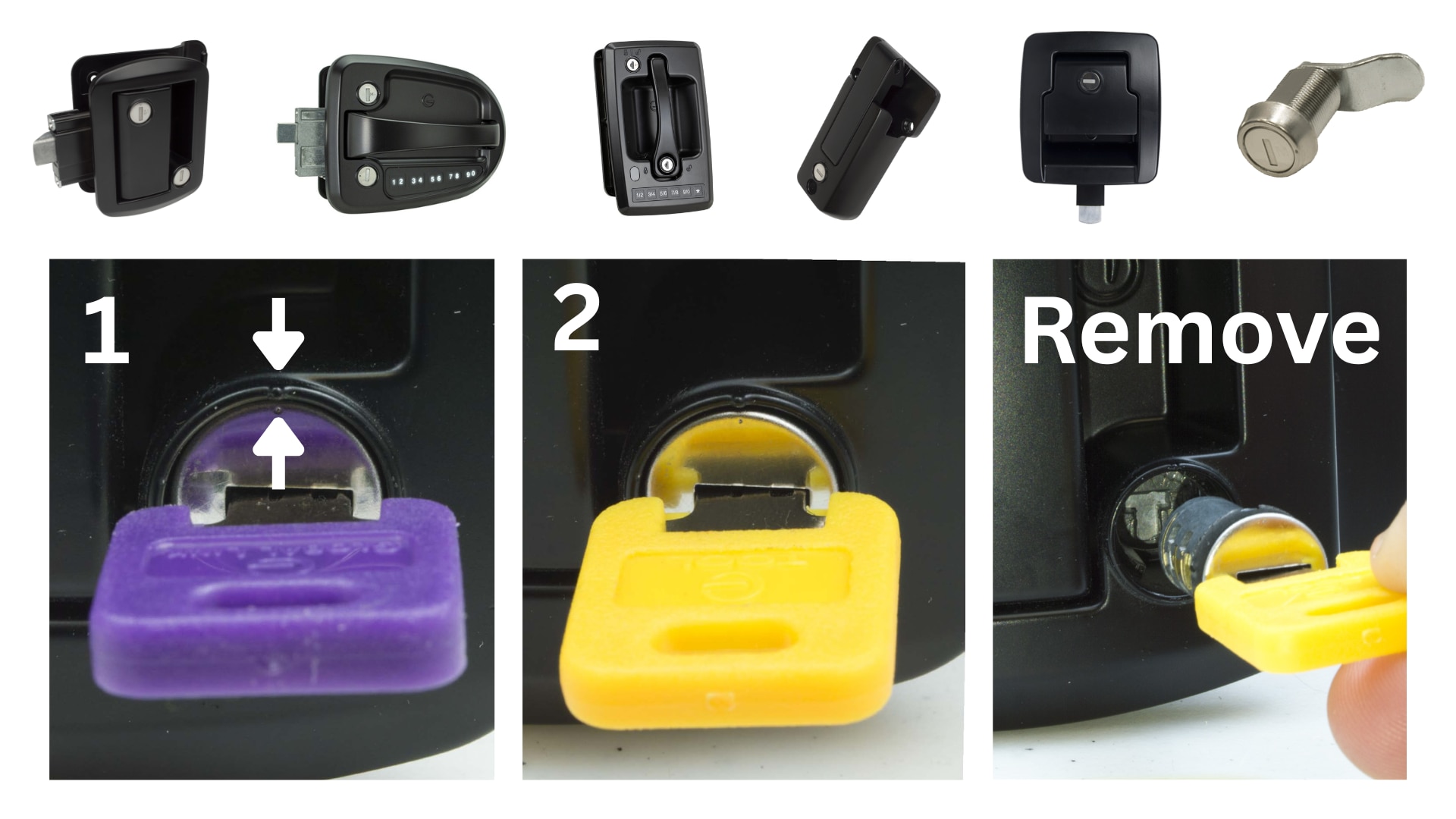
Cylinder & Key Notes
- Mastered Cylinder: Operates the entrance door paddle handle and compartment/baggage door locks and is operable with the GLD Master Key and the GLD User Key with the same key code.
- Non-Mastered Cylinder: Operates the deadbolt and is operable ONLY by the GLD User Key with the same key code.
Key Cylinder Installation
1a. T-Slot Alignment
Ensure the bottom of the T-slot in the cylinder housing points to the opposite side of the alignment dimples. Adjust with a screwdriver if needed.
1b. Cylinder Insertion
Insert the cylinder using the GLD Change Key. Confirm that the dimples on the cylinder face align with the dimples on the cylinder housing.
2. Change Key Removal
With the key cylinder fully inserted, place your thumb firmly over the face of the cylinder and withdraw the change key. The cylinder face should appear recessed in the housing for a secure fit.
3. Seating the Key Cylinder
Use the GLD User Key with the matching key code and rotate to properly seat the key cylinder inside the housing.
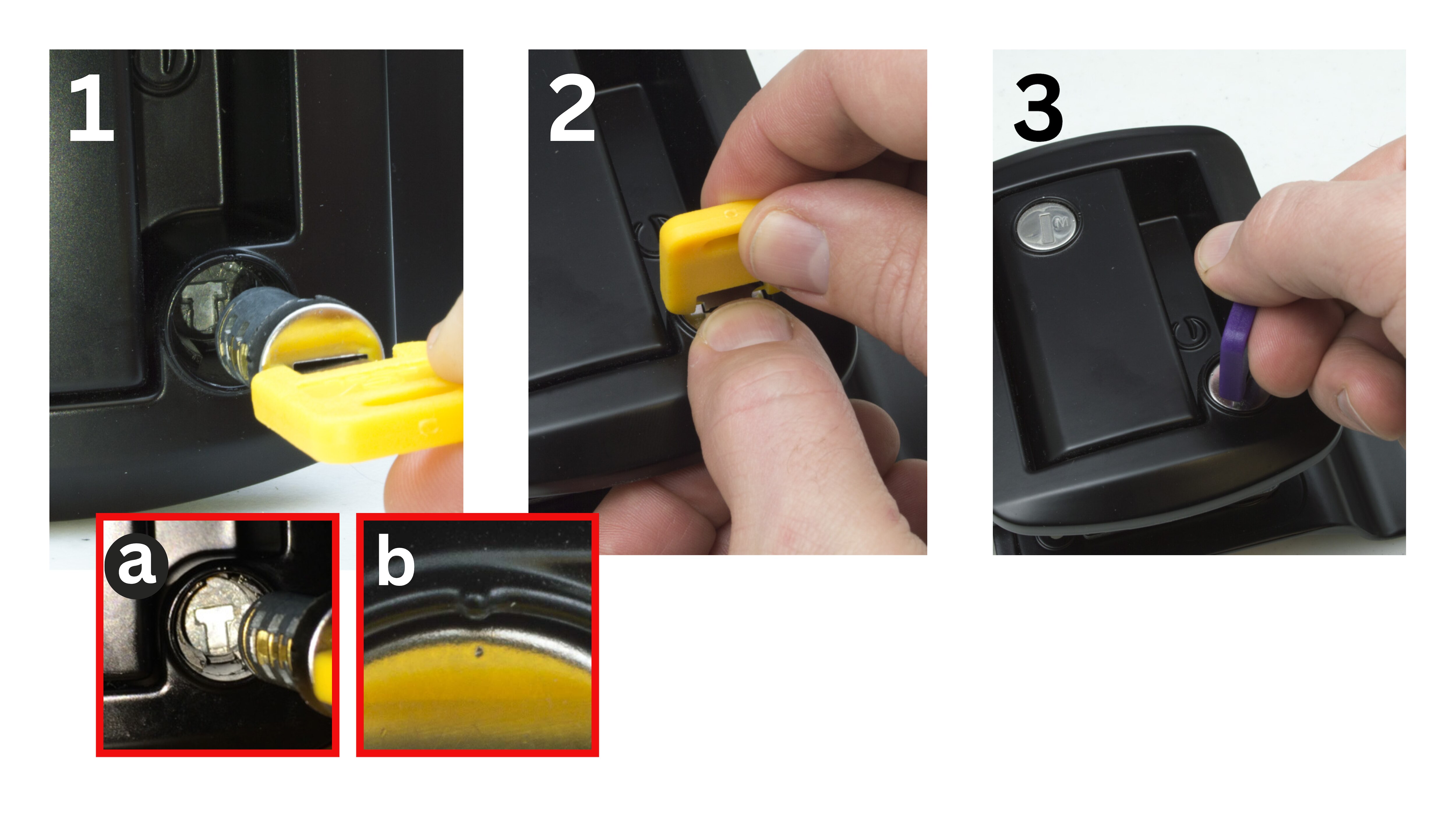
Rotation Reminder
Some assemblies require rotating the cylinder 180° to seat properly. Always verify T-slot and dimple alignment before operating.
WHAT YOU’LL NEED
You will need a 300 Series change key for removal and a 500 Series change key for installation during your upgrade. These keys are available to rent in a convenient pack.
500 Series cylinders matching your chosen GLD key code.
Forgot or can’t find your current key code?
If you’ve misplaced your key or don’t know your key code, we can help you identify it. Click here to find your key code .
HOW-TO VIDEO
Key Cylinder Removal (300 → 500)
1. Align
With the GLD User Key (purple), align the dimple on the 300 Series cylinder with the housing dimples (see notes on Cylinders and Keys in info panel below). Remove User Key once aligned.
2. Remove
Insert the 300 Series Change Key (yellow) and withdraw the cylinder from the housing.
Cylinder & Key Notes
- Mastered Cylinder: Operates the entrance door paddle handle and compartment/baggage door locks and is operable with the GLD Master Key and the GLD User Key with the same key code.
- Non-Mastered Cylinder: Operates the deadbolt and is operable ONLY by the GLD User Key with the same key code.
Key Cylinder Installation (to 500)
1a. T-Slot Alignment
Ensure the bottom of the T-slot points opposite the alignment dimples.
1b. Insert 500 Cylinder
Insert using the 500 Series Change Key (blue); align the triangle on the cylinder face with the housing dimples.
2. Change Key Removal
Hold the cylinder face and remove the change key; confirm the face is slightly recessed in the housing.
3. Seat & Test
Use the 500 Series User Key (black) to rotate and fully seat the cylinder; test operation.
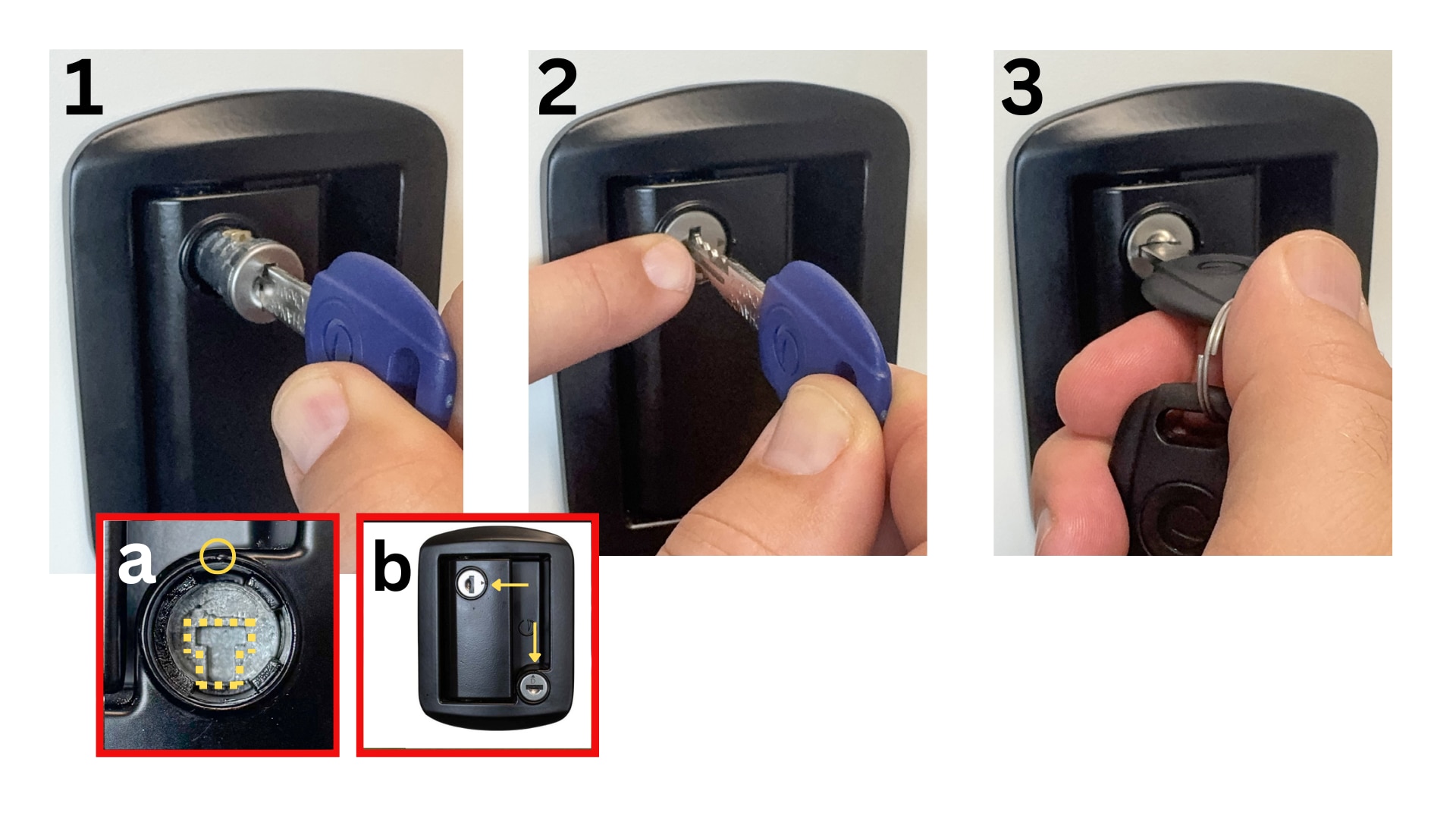
Rotation Reminder
Some assemblies require rotating the cylinder 180° to seat properly. Always verify T-slot and (triangle/dimple) alignment before operating.